0 1 0 1 0 1 0 1 0 1 0 1 0 1 0 1 0 1 0 1 0 1 0 1 0 1 0 1 0 1 0 1 0 1 0 1 0 1 0 1 0 1 0 1 0 1 0 1 0 1 0 1 0 1 0 1 0 1 0 1 0 1 0 1 0 1 0 1 0 1 0 1 0 1 0 1 0 1 0 1 0 1 0 1 0 1 0 1 0 1 0 1 0 1 0 1 0 1 0 1 0 1 0 1 0 1 0 1 0 1 0 1 0 1 0 1 0 1 0 1 0 1 0 1 0 1 0 1 0 1 0 1 0 1 0 1 0 1 0 1
JPPINTO
  • Home
  • Certifications
  • About
  • Contact
  • Gallery
  • Current Setup
Contact

Search

December 25, 2019 / PowerShell, Windows 10

Windows 10 PATH Environment Variable Update with PowerShell
Tags: environment variable, path environment variable, powershell

Testing Environment Information:

  • Windows 10 Enterprise: Version 1909 (OS Build 18396.535) (Type winver or systeminfo at a Command Prompt)
  • PowerShell Version: 5.1.18362.145 (Type “HOST” at a PowerShell Prompt)
  • Testing Date: 12/25/2019

Background:

Unfortunately, when using the following PowerShell command, it erases all other entries in your PATH Environment Variable. Most forums I’ve seen are telling people to do this, good thing I backed up my paths before trying this method, as all my paths got erased.

[Environment]::SetEnvironmentVariable("PATH","C:\Testing","Machine")

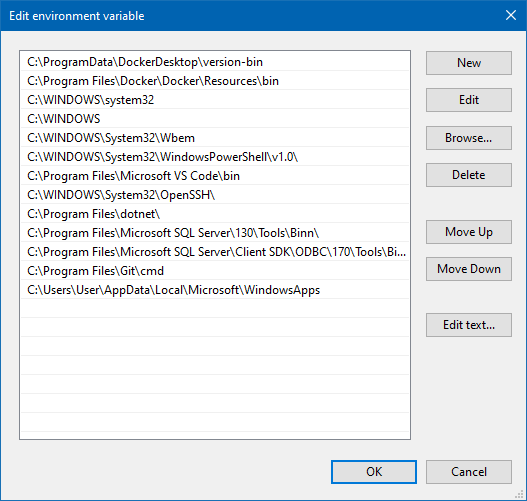
Let’s see if we can fix this, first let us exam our current paths we have configured (it’s good to take a backup of this configuration before you make any changes, you can do that with the following PowerShell command:

$env:path | Out-File C:\EnvironmentVariableBackup.txt
Script:

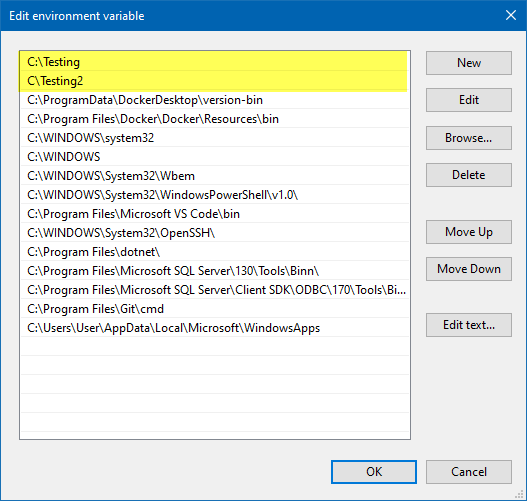
Let’s create a whole script now so we can update the PATH Environment Variable and be able to use it in the future. I saved this to a file named UpdatePathEnvironmentVariable.ps1.

# Separate multiple paths with semi-colon ;
$NewPathsToAdd = "C:\Testing;C\Testing2" 

# Save this to a text file in case you need it later, for now we'll output it to the console
$CurrentPaths = $env:path 
Write-Host "`r`n `$CurrentPaths variable contains the following paths: $($currentPaths)" -ForegroundColor Cyan

# Combine the old path and new path(s) into one string, you can swap these variables around if you want the new paths at the bottom
$PathUpdate = $NewPathsToAdd + ";" + $CurrentPaths
Write-Host "`r`n `$PathUpdate variable will load the following paths: $($PathUpdate)" -ForegroundColor Cyan

# The last parameter ("Machine"),should be either User or Machine, depending on where you want the variable stored
[Environment]::SetEnvironmentVariable("PATH","$PathUpdate","Machine")


Post Views: 548
<- Update Enom Domain Name via PowerShell (Dynamic DNS Update)
Install Docker Desktop for Windows on Windows 10 Enterprise ->

Categories

  • Active Directory (5)
  • Amazon Cloud Services (1)
  • Blazor (1)
  • C# (C-Sharp) (3)
  • CI/CD Pipelines (1)
  • Containers (4)
  • Development (1)
  • Docker (3)
  • General (5)
  • IIS 6.0 (4)
  • IIS 7.0 (10)
  • IIS 8.0 (1)
  • Infrastructure as Code (IaC) (1)
  • Kubernetes (3)
  • MySQL (1)
  • Office 2010 (1)
  • PHP (1)
  • PowerShell (3)
  • SharePoint 2007 (8)
  • SharePoint 2010 (19)
  • SharePoint 2013 (2)
  • SMTP (4)
  • SQL Server 2008 (1)
  • SQL Server 2008 R2 (1)
  • SQL Server 2012 (2)
  • SQL Server 2019 (1)
  • Uncategorized (1)
  • URL Rewrite (2)
  • Visual Studio 2019 (1)
  • Visual Studio Code (1)
  • Windows 10 (2)
  • Windows 2003 (9)
  • Windows 2008 (18)
  • Windows 2012 (6)
  • Windows 7 (3)
  • Windows Firewall (1)
  • Windows Vista (1)

Recent Posts

  • Install Terraform on Windows
  • Create a .NET Core 3.1 Console App in Visual Studio Code
  • Install a stand-alone SQL Server 2019 Enterprise Server
  • Create a Blazor App project in Visual Studio 2019
  • Username and Password for minikube Virtual Machine

Advertisement

Tags

backconnectionhostnames custom column default gateway disappears disable shutdown event tracker error opening exe exe permissions externalize blob externalize sharepoint data facebook spam filezilla server firewall rules filazilla full installation http redirect https https redirect IIS iis7 iis 7 installation IIS installation index server configuration installing cumulative updates load balance central administration magic default gateway missing default gateway moss advanced search nlb no default gateway powershell redirect http to https search column sharepoint 2010 cumulative updates sharepoint 2010 farm build sharepoint 2010 farm configuration sharepoint 2010 farm installation sharepoint data externalization shutdown event tracker shutdown tracker SMTP storagepoint Windows 7 windows firewall configuration windows live messenger crash windows server 2008 wlbs x86
© 2026 JPPinto.com – Tech Blog. All rights reserved.