0 1 0 1 0 1 0 1 0 1 0 1 0 1 0 1 0 1 0 1 0 1 0 1 0 1 0 1 0 1 0 1 0 1 0 1 0 1 0 1 0 1 0 1 0 1 0 1 0 1 0 1 0 1 0 1 0 1 0 1 0 1 0 1 0 1 0 1 0 1 0 1 0 1 0 1 0 1 0 1 0 1 0 1 0 1 0 1 0 1 0 1 0 1 0 1 0 1 0 1 0 1 0 1 0 1 0 1 0 1 0 1 0 1 0 1 0 1 0 1 0 1 0 1 0 1 0 1 0 1 0 1 0 1 0 1 0 1 0 1
JPPINTO
  • Home
  • Blog
  • Certifications
  • About
  • Contact
  • Shop
  • Gallery
  • Current Setup
Contact

Search

November 16, 2011 / SharePoint 2007, SharePoint 2010

Batch File to Slipstream Service Pack (SP) and Cumulative Updates (CU) for MOSS 2007 or SharePoint 2010
Tags: batch file, slipstream cumulative updates, slipstream service pack
Featured image for Batch File to Slipstream Service Pack (SP) and Cumulative Updates (CU) for MOSS 2007 or SharePoint 2010

I perform a lot of SharePoint installs. I like to Slipstream both the Service Pack and the Cumulative Updates before I begin an install. In the zip file you find the batch file and links to the latest MOSS 2007 and SharePoint 2010 Service Packs. I will keep this zip file up to date when new Service Packs and Cumulative Updates come out.

  • New Farm – Slipstream base binaries with SP’s and CU’s > Install Slip-streamed binaries on all boxes > Configure SharePoint.
  • Existing Farm – Please see link this link – https://jppinto.com/2010/10/installing-august-sharepoint-2010-cumulative-update/

Prerequisites

  • Create folder and drop in the base installation binaries of MOSS/SharePoint (i.e. C:\Software\SharePoint2010base)
  • Create folder and drop in the 4 updates (2 SP’s and 2 CU’s) (i.e. C:\Software\SP2010Updates)

Setting Variables

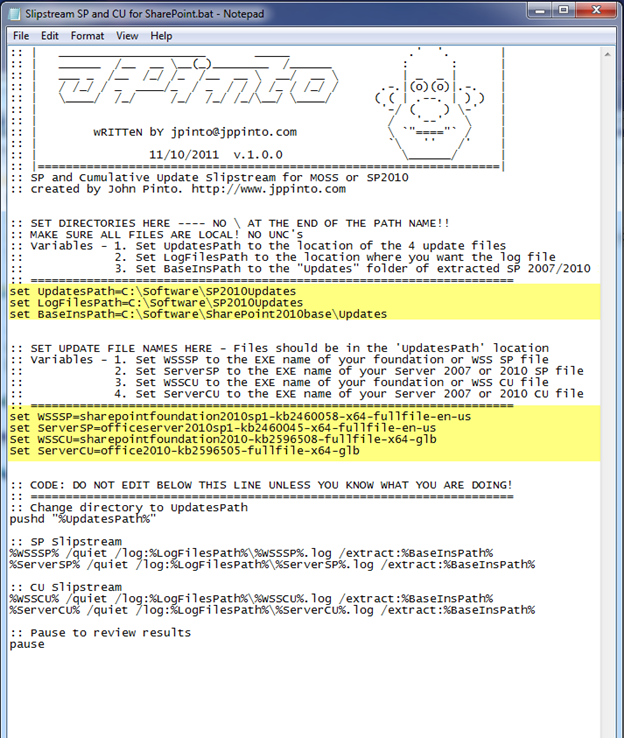
You have to set 7 variables in the batch file. First we need to set file paths

  • UpdatesPath = Set UpdatesPath to the location of the 4 update files
  • LogFilesPath = Set LogFilesPath to the location where you want the log file
  • BaseInsPath = Set BaseInsPath to the “Updates” folder of extracted SP 2007/2010 Install

Next we need to set the EXE names of the Service Packs and the Cumulative Updates

  • WSSSP = Set WSSSP to the EXE name of your Foundation or WSS SP file
  • ServerSP = Set ServerSP to the EXE name of your Server 2007 or 2010 SP file
  • WSSCU = Set WSSCU to the EXE name of your foundation or WSS CU file
  • ServerCU = Set ServerCU to the EXE name of your Server 2007 or 2010 CU file

Download: https://jppinto.com/help/SlipstreamSPandCUforSharePoint.zip
Verification

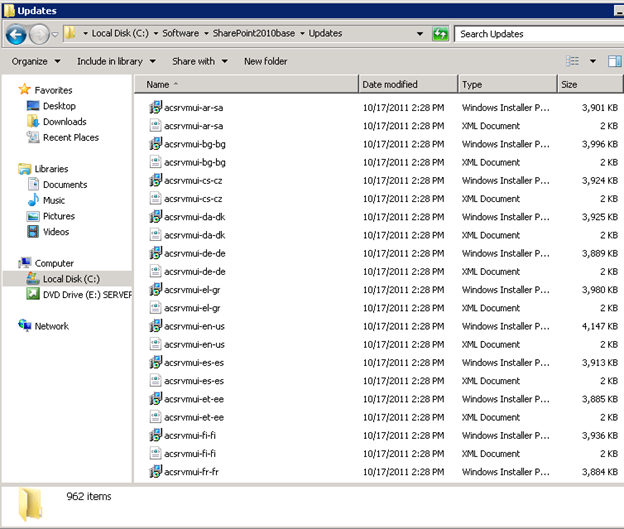
By default the “Updates” folder in the directory containing the base installation does not have any files in it. Once the 4 files are extracted you should have a little over 900 files. In this case my “Updates” was about 2.04 GB when I slip-streamed SP1 and the October 2011 CU’s for SharePoint 2010.
 

Post Views: 193
<- Configure Active Directory (AD) Synchronization for SharePoint 2010
System.Security.AccessControl.PrivilegeNotHeldException error during SharePoint Products Configuration Wizard on MOSS 2007 or SharePoint 2010 ->

Categories

  • Active Directory (5)
  • AI (3)
  • Amazon Cloud Services (1)
  • AWS (2)
  • Blazor (1)
  • C# (C-Sharp) (3)
  • CI/CD Pipelines (1)
  • Cloud (1)
  • Cloudflare (2)
  • Codex (1)
  • Containers (4)
  • Deployment (2)
  • Development (5)
  • DNS (1)
  • Docker (3)
  • Email (1)
  • Family (1)
  • General (5)
  • IIS 6.0 (4)
  • IIS 7.0 (10)
  • IIS 8.0 (1)
  • Infrastructure as Code (IaC) (1)
  • Kubernetes (3)
  • Linux (9)
  • Microsoft 365 (2)
  • MySQL (1)
  • Office 2010 (1)
  • PHP (1)
  • PowerShell (11)
  • Productivity (1)
  • Security (1)
  • Servers (9)
  • SharePoint 2007 (8)
  • SharePoint 2010 (19)
  • SharePoint 2013 (2)
  • SharePoint Online (1)
  • SMTP (4)
  • SQL Server 2008 (1)
  • SQL Server 2008 R2 (1)
  • SQL Server 2012 (2)
  • SQL Server 2019 (1)
  • SSL (1)
  • Travel (1)
  • Troubleshooting (1)
  • Ubuntu (9)
  • Uncategorized (1)
  • URL Rewrite (2)
  • Visual Studio 2019 (1)
  • Visual Studio Code (1)
  • Windows 10 (7)
  • Windows 2003 (9)
  • Windows 2008 (18)
  • Windows 2012 (6)
  • Windows 7 (3)
  • Windows Firewall (1)
  • Windows Vista (1)
  • WordPress (3)
  • WP-CLI (3)

Recent Posts

  • GPT-5.6 Sol Changes How We Prompt—and How We Write AGENTS.md
  • Protect a Domain That Does Not Send Email with SPF, DMARC, and Null MX
  • Turning Our Atlanta Vacation Photos into a Video with PowerShell
  • Bulk Create Cloudflare Origin CA Certificates with PowerShell
  • Test a Cloudflare Global API Key Connection with PowerShell

Advertisement

Tags

agents.md ai coding agents aws bash cloudflare cloud storage codex context engineering developer workflow dev to production dns externalize blob externalize sharepoint data full installation http redirect https IIS IIS installation index server configuration installing cumulative updates linux load balance central administration microsoft 365 nginx powerpoint powershell redirect http to https s3 server setup sharepoint 2010 cumulative updates sharepoint 2010 farm build sharepoint 2010 farm configuration sharepoint 2010 farm installation sharepoint data externalization SMTP ssl storagepoint ubuntu web server windows Windows 7 windows server 2008 wordpress wp-cli x86
© 2026 JPPinto.com. All rights reserved.