0 1 0 1 0 1 0 1 0 1 0 1 0 1 0 1 0 1 0 1 0 1 0 1 0 1 0 1 0 1 0 1 0 1 0 1 0 1 0 1 0 1 0 1 0 1 0 1 0 1 0 1 0 1 0 1 0 1 0 1 0 1 0 1 0 1 0 1 0 1 0 1 0 1 0 1 0 1 0 1 0 1 0 1 0 1 0 1 0 1 0 1 0 1 0 1 0 1 0 1 0 1 0 1 0 1 0 1 0 1 0 1 0 1 0 1 0 1 0 1 0 1 0 1 0 1 0 1 0 1 0 1 0 1 0 1 0 1 0 1
JPPINTO
  • Home
  • Blog
  • Certifications
  • About
  • Contact
  • Shop
  • Gallery
  • Current Setup
Contact

Search

December 15, 2011 / Active Directory, SharePoint 2007, SharePoint 2010

System.Security.AccessControl.PrivilegeNotHeldException error during SharePoint Products Configuration Wizard on MOSS 2007 or SharePoint 2010
Tags: moss 2007 config error, PrivilegeNotHeldException, Security.AccessControl moss, sharepoint 2010 config error, System.Security.AccessControl, System.Security.AccessControl.PrivilegeNotHeldException
Featured image for System.Security.AccessControl.PrivilegeNotHeldException error during SharePoint Products Configuration Wizard on MOSS 2007 or SharePoint 2010

When reviewing the event log you will see the following error and you get the error in the screen shot below.

Failed to create the configuration database.

An exception of type System.Security.AccessControl.PrivilegeNotHeldException was thrown.” Additional exception information: The process does not possess the ‘SeSecurityPrivilege’ privilege which is required for this operation. System.Security.AccessControl.PrivilegeNotHeldException: The process does not possess the ‘SeSecurityPrivilege’ privilege which is required for this operation
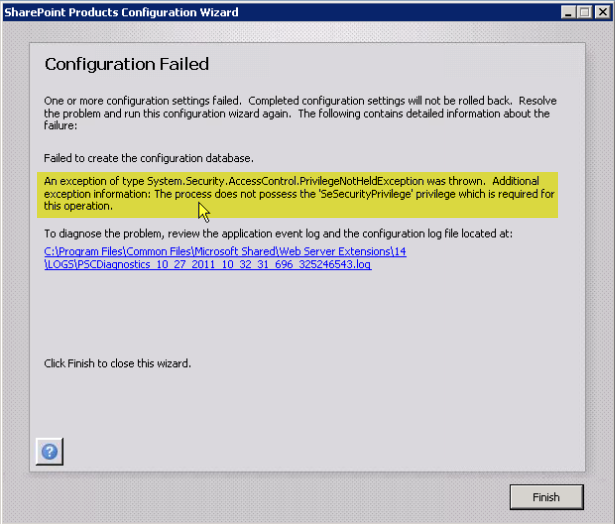
In this particular case the problem came down to the account running the configuration wizard not having “Manage auditing and security log” rights in Group Policy. This setting was modified by a GPO in Active Directory.
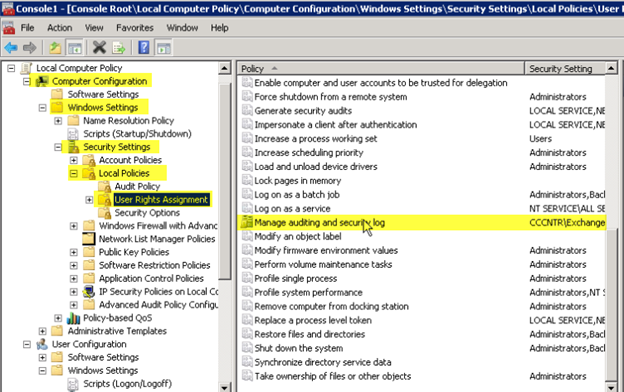
We can see that this GPO was modified, in this case, probably for Exchange because “Exchange Enterprise Servers” was explicitly added.
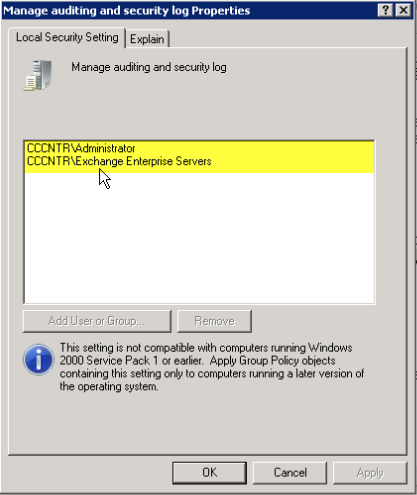
You have two options to correct this issue:

  1. Add MOSS 2007 or SharePoint 2010 Service Accounts to this GPO – This is not recommended because we do not know what else is configured in this GPO that can cause issues.
  2. Move the computer account to an OU that is blocking inheritance. – This is the preferred method because we don’t know what else is configured in the GPO that can cause other issues.
Post Views: 423
<- Batch File to Slipstream Service Pack (SP) and Cumulative Updates (CU) for MOSS 2007 or SharePoint 2010
sp_SDS Stored Procedure updated to work with SQL Server 2008 R2 & SQL Server 2012 ->

Categories

  • Active Directory (5)
  • AI (5)
  • Amazon Cloud Services (1)
  • AWS (3)
  • Blazor (1)
  • C# (C-Sharp) (3)
  • CI/CD Pipelines (1)
  • Cloud (1)
  • Cloudflare (2)
  • Codex (2)
  • Containers (4)
  • Deployment (2)
  • Development (6)
  • DNS (1)
  • Docker (3)
  • Email (1)
  • Family (1)
  • General (5)
  • IIS 6.0 (4)
  • IIS 7.0 (10)
  • IIS 8.0 (1)
  • Infrastructure as Code (IaC) (1)
  • Kubernetes (3)
  • Linux (11)
  • Microsoft 365 (2)
  • MySQL (1)
  • Office 2010 (1)
  • PHP (1)
  • PowerShell (11)
  • Productivity (1)
  • Security (2)
  • Servers (9)
  • SharePoint 2007 (8)
  • SharePoint 2010 (19)
  • SharePoint 2013 (2)
  • SharePoint Online (1)
  • SMTP (4)
  • SQL Server 2008 (1)
  • SQL Server 2008 R2 (1)
  • SQL Server 2012 (2)
  • SQL Server 2019 (1)
  • SSL (1)
  • Travel (1)
  • Troubleshooting (1)
  • Ubuntu (9)
  • Uncategorized (1)
  • URL Rewrite (2)
  • Visual Studio 2019 (1)
  • Visual Studio Code (1)
  • Web Server (1)
  • Windows 10 (7)
  • Windows 2003 (9)
  • Windows 2008 (18)
  • Windows 2012 (6)
  • Windows 7 (3)
  • Windows Firewall (1)
  • Windows Server (1)
  • Windows Vista (1)
  • WordPress (5)
  • WP-CLI (3)

Recent Posts

  • Fix ‘Codex Could Not Start’ in VS Code Remote SSH on Linux
  • Move WordPress Uploads to Amazon S3 with the Uploads to S3 Plugin
  • WordPress Must-Use Plugins: MU Plugins vs. Regular Plugins
  • Install Codex Desktop on Windows Server and Control It from Your Phone
  • Create an Internal Certificate Authority for Private Websites

Advertisement

Tags

agents.md ai coding agents aws bash cloudflare cloud storage codex context engineering developer workflow dev to production dns externalize blob externalize sharepoint data full installation https IIS IIS installation index server configuration installing cumulative updates linux load balance central administration microsoft 365 nginx powerpoint powershell redirect http to https s3 server setup sharepoint 2010 cumulative updates sharepoint 2010 farm build sharepoint 2010 farm configuration sharepoint 2010 farm installation sharepoint data externalization ssl storagepoint tls ubuntu ubuntu server web server windows windows server 2008 wordpress WordPress plugins wp-cli x86
© 2026 JPPinto.com. All rights reserved.