0 1 0 1 0 1 0 1 0 1 0 1 0 1 0 1 0 1 0 1 0 1 0 1 0 1 0 1 0 1 0 1 0 1 0 1 0 1 0 1 0 1 0 1 0 1 0 1 0 1 0 1 0 1 0 1 0 1 0 1 0 1 0 1 0 1 0 1 0 1 0 1 0 1 0 1 0 1 0 1 0 1 0 1 0 1 0 1 0 1 0 1 0 1 0 1 0 1 0 1 0 1 0 1 0 1 0 1 0 1 0 1 0 1 0 1 0 1 0 1 0 1 0 1 0 1 0 1 0 1 0 1 0 1 0 1 0 1 0 1
JPPINTO
  • Home
  • Certifications
  • About
  • Contact
  • Gallery
  • Current Setup
Contact

Search

March 21, 2009 / IIS 7.0

Server Error in Ôò¼├┤Ôö£├ºÔö£ÔöÉ/’ Application on IIS 7 (allowDefinition=’MachineToApplication’)
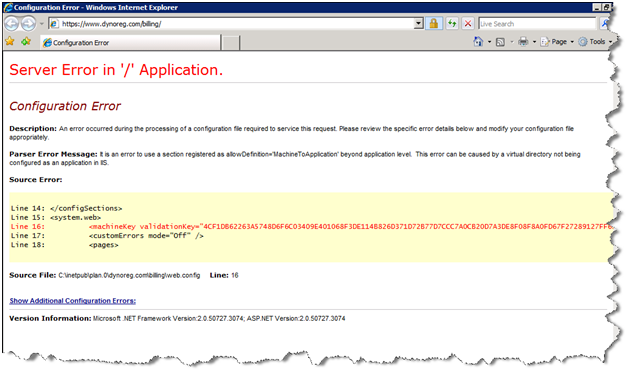
I received this error in IIS 7 when I went to the default application of an ASP billing application that I installed on my web server.

In this case the error is pretty self explanatory, in the error it says "This error can be caused by a virtual directory not being configured as an application in IIS." With that known this article will describe how to set a web directory as an application in IIS 7.

Error Message:

Server Error in ‘/’ Application.

Configuration Error

Description: An error occurred during the processing of a configuration file required to service this request. Please review the specific error details below and modify your configuration file appropriately.

Parser Error Message: It is an error to use a section registered as allowDefinition=’MachineToApplication’ beyond application level.  This error can be caused by a virtual directory not being configured as an application in IIS.

Source Error:

Line 14:     </configSections>

Line 15:     <system.web>

Line 16:         <machineKey validationKey="4CF1DB62263A5748D6F6C03409E401068F3DE114B826D371D72B77D7CCC7A0CB20D7A3DE8F08F8A0FD67F27289127FF62F538EE82B900C1DCE7A44052BD92D4E" decryptionKey="8CD524CA8D6B430C259590D94A95A4CF6D1B1D10F75BFA256A4F43231FEC523C" validation="SHA1" decryption="AES" />

Line 17:         <customErrors mode="Off" />

Line 18:         <pages>

Source File: C:\inetpub\plan.0\dynoreg.com\billing\web.config    Line: 16
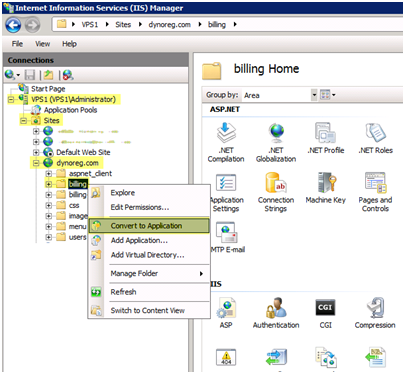
Open "IIS Manager", right click the directory and select "Convert to Application"
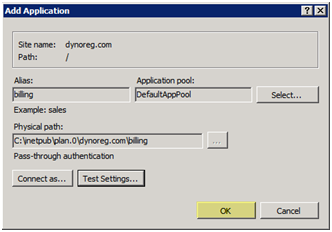
You can keep the default settings or adjust the settings of the web application here. Press "OK"
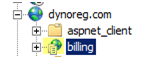
You will now see the web application with a small globe next the directory name instead of a folder this indicates it’s a web application
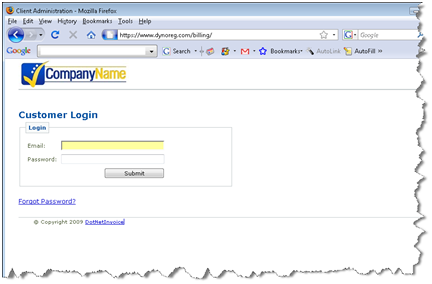
Now when we browse to the /billing directory we no longer get the error.
Post Views: 460
<- Configuring Windows Firewall for FileZilla Server on Windows Server 2008
Install and Configure FastCGI & PHP 5.2.9 on (IIS 7) Windows Server 2008 ->

Categories

  • Active Directory (5)
  • Amazon Cloud Services (1)
  • Blazor (1)
  • C# (C-Sharp) (3)
  • CI/CD Pipelines (1)
  • Containers (4)
  • Development (1)
  • Docker (3)
  • General (5)
  • IIS 6.0 (4)
  • IIS 7.0 (10)
  • IIS 8.0 (1)
  • Infrastructure as Code (IaC) (1)
  • Kubernetes (3)
  • MySQL (1)
  • Office 2010 (1)
  • PHP (1)
  • PowerShell (3)
  • SharePoint 2007 (8)
  • SharePoint 2010 (19)
  • SharePoint 2013 (2)
  • SMTP (4)
  • SQL Server 2008 (1)
  • SQL Server 2008 R2 (1)
  • SQL Server 2012 (2)
  • SQL Server 2019 (1)
  • Uncategorized (1)
  • URL Rewrite (2)
  • Visual Studio 2019 (1)
  • Visual Studio Code (1)
  • Windows 10 (2)
  • Windows 2003 (9)
  • Windows 2008 (18)
  • Windows 2012 (6)
  • Windows 7 (3)
  • Windows Firewall (1)
  • Windows Vista (1)

Recent Posts

  • Install Terraform on Windows
  • Create a .NET Core 3.1 Console App in Visual Studio Code
  • Install a stand-alone SQL Server 2019 Enterprise Server
  • Create a Blazor App project in Visual Studio 2019
  • Username and Password for minikube Virtual Machine

Advertisement

Tags

backconnectionhostnames custom column default gateway disappears disable shutdown event tracker error opening exe exe permissions externalize blob externalize sharepoint data facebook spam filezilla server firewall rules filazilla full installation http redirect https https redirect IIS iis7 iis 7 installation IIS installation index server configuration installing cumulative updates load balance central administration magic default gateway missing default gateway moss advanced search nlb no default gateway powershell redirect http to https search column sharepoint 2010 cumulative updates sharepoint 2010 farm build sharepoint 2010 farm configuration sharepoint 2010 farm installation sharepoint data externalization shutdown event tracker shutdown tracker SMTP storagepoint Windows 7 windows firewall configuration windows live messenger crash windows server 2008 wlbs x86
© 2026 JPPinto.com – Tech Blog. All rights reserved.