SharePoint 2010: IIS Installation
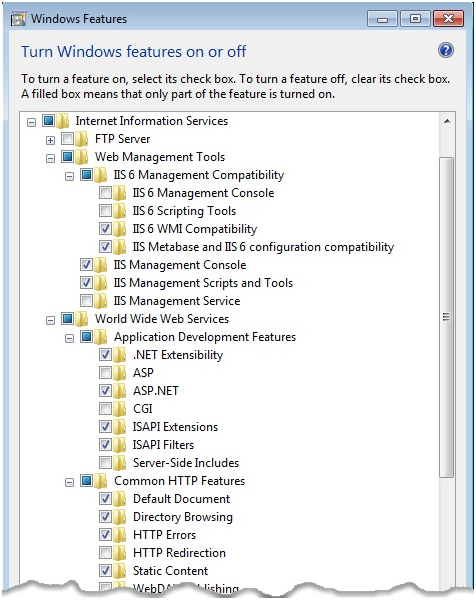
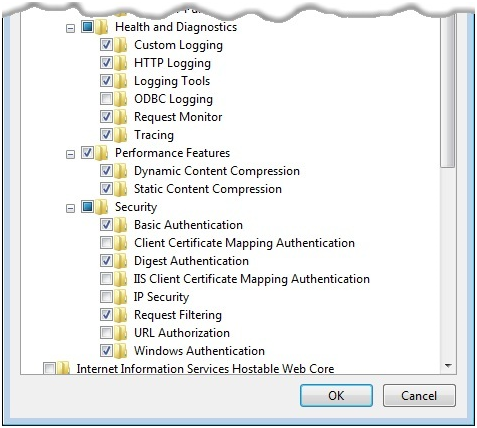
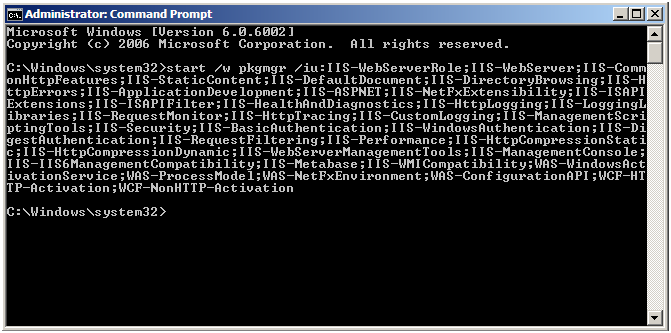
IIS should be installed on all WFE’s and all Indexing Servers. You can manually enable each of the required Windows Features or you can do this quickly by copying and running the following command in a Command Prompt window.
Note: The following text contains line breaks. You must remove the line breaks to run this script from a command prompt.
You can download this command here with no line breaks in it: Install.IIS.for.SharePoint.txt
start /w pkgmgr /iu:IIS-WebServerRole;IIS-WebServer;IIS-CommonHttpFeatures;IIS-StaticContent;IIS-DefaultDocument;IIS-DirectoryBrowsing;IIS-HttpErrors;IIS-ApplicationDevelopment;IIS-ASPNET;IIS-NetFxExtensibility;IIS-ISAPIExtensions;IIS-ISAPIFilter;IIS-HealthAndDiagnostics;IIS-HttpLogging;IIS-LoggingLibraries;IIS-RequestMonitor;IIS-HttpTracing;IIS-CustomLogging;IIS-ManagementScriptingTools;IIS-Security;IIS-BasicAuthentication;IIS-WindowsAuthentication;IIS-DigestAuthentication;IIS-RequestFiltering;IIS-Performance;IIS-HttpCompressionStatic;IIS-HttpCompressionDynamic;IIS-WebServerManagementTools;IIS-ManagementConsole;IIS-IIS6ManagementCompatibility;IIS-Metabase;IIS-WMICompatibility;WAS-WindowsActivationService;WAS-ProcessModel;WAS-NetFxEnvironment;WAS-ConfigurationAPI;WCF-HTTP-Activation;WCF-NonHTTP-Activation
This may take a while to run on some VM’s it has taken over 15 minutes to complete and it does not give you a status, you should manually check to make sure all of the features were turned on. If you want to do this manually select the following components to turn on: