0 1 0 1 0 1 0 1 0 1 0 1 0 1 0 1 0 1 0 1 0 1 0 1 0 1 0 1 0 1 0 1 0 1 0 1 0 1 0 1 0 1 0 1 0 1 0 1 0 1 0 1 0 1 0 1 0 1 0 1 0 1 0 1 0 1 0 1 0 1 0 1 0 1 0 1 0 1 0 1 0 1 0 1 0 1 0 1 0 1 0 1 0 1 0 1 0 1 0 1 0 1 0 1 0 1 0 1 0 1 0 1 0 1 0 1 0 1 0 1 0 1 0 1 0 1 0 1 0 1 0 1 0 1 0 1 0 1 0 1
JPPINTO
  • Home
  • Certifications
  • About
  • Contact
  • Gallery
  • Current Setup
Contact

Search

July 14, 2010 / Active Directory, Windows 2003, Windows 2008

Creating a GPO to Disable Services on Windows Servers
Tags: create a group policy object, disable windows services, GPO

I have 5 SharePoint Servers; I would like to disable a couple unused and unnecessary services on all of them.

Create Organizational Unit (OU)

The first thing I am going to do is create an OU (Organizational Unit) in AD and add these servers to the OU

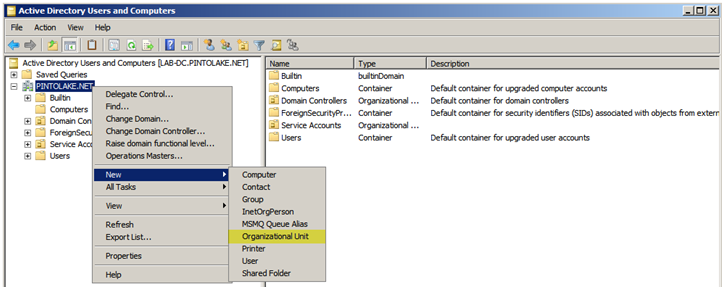
Within “Active Directory Users and Computers” right click the domain

Choose “New”

Choose “Organizational Unit”

To read more about creating basic OU structures please read: http://technet.microsoft.com/en-us/library/cc728229%28WS.10%29.aspx
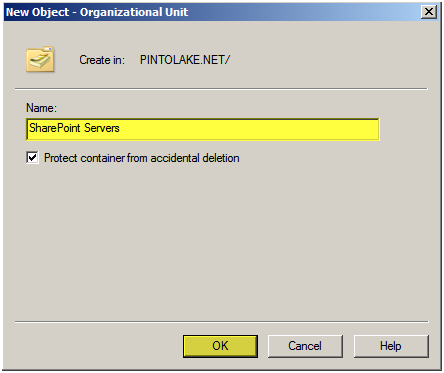
I am going to call this OU “SharePoint Servers” since this is for my SharePoint Servers

Press “OK”
I dragged and dropped my five SharePoint farm servers from the Computer container to the SharePoint Servers OU

Select the “SharePoint Servers” and verify the servers are in the OU

Create Group Policy Object (GPO)

To read more about GPO’s please read: http://technet.microsoft.com/en-us/library/cc782678%28WS.10%29.aspx

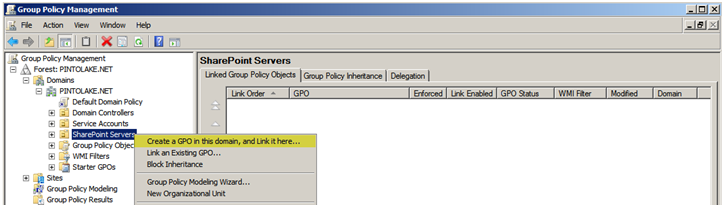
From the Administrative Tools menu choose “Group Policy Management”

Expand the Domain and Select the OU, in this case I am Selecting “SharePoint Servers”

Right Click and select “Create a GPO in this domain, and Link it hereÔò¼├┤Ôö£├ºÔö¼┬¼”
We will name this GPO “Disable Services”

Press “OK”
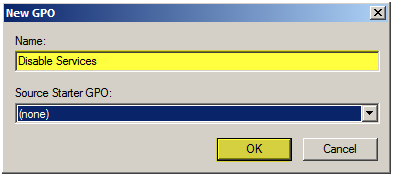
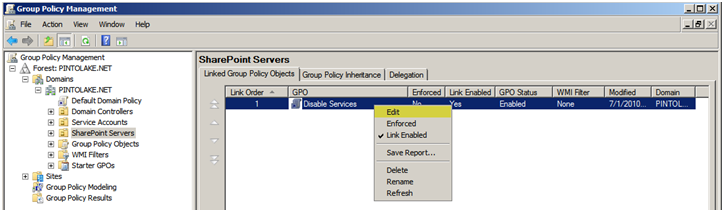
The New GPO will show up in the SharePoint Server OU on the right side of the screen where the list of GPO’s are located

Right Click and select “Edit”
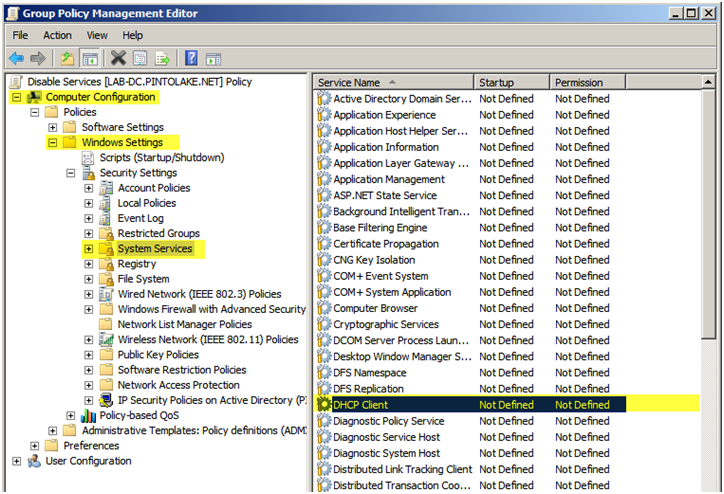
Navigate to Computer Configuration > Windows Settings > System Services

Double click the Service which you wish to change
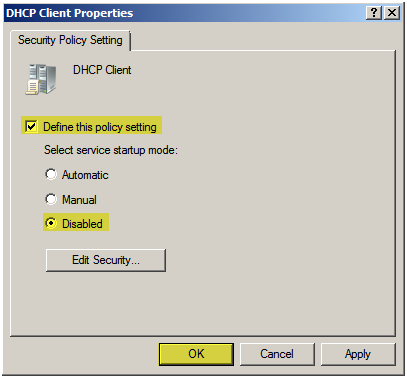
Check on “Define this policy setting” and select “Disabled”

Press “OK”

Repeat this process for all services you wish to disable.
Repeat the last step for all services you wish to disable.

Close out of the Group Policy Management Editor

Close out of the Group Policy Management Console

Testing

Service before GPO

I rebooted the server and the GPO was applied

I usually disable the following services on Windows Server 2008, for Windows 2003 Server there are a lot more services you can disable, which includes my favorite “Windows Audio”, why in the world would you need this running on a server?

  • DHCP Client
  • Print Spooler
  • Windows Firewall
Post Views: 1,283
<- DCPROMO on Windows Server 2008
How to Configure IIS SMTP Server to forward emails using a Gmail account ->

Categories

  • Active Directory (5)
  • Amazon Cloud Services (1)
  • Blazor (1)
  • C# (C-Sharp) (3)
  • CI/CD Pipelines (1)
  • Containers (4)
  • Development (1)
  • Docker (3)
  • General (5)
  • IIS 6.0 (4)
  • IIS 7.0 (10)
  • IIS 8.0 (1)
  • Infrastructure as Code (IaC) (1)
  • Kubernetes (3)
  • MySQL (1)
  • Office 2010 (1)
  • PHP (1)
  • PowerShell (3)
  • SharePoint 2007 (8)
  • SharePoint 2010 (19)
  • SharePoint 2013 (2)
  • SMTP (4)
  • SQL Server 2008 (1)
  • SQL Server 2008 R2 (1)
  • SQL Server 2012 (2)
  • SQL Server 2019 (1)
  • Uncategorized (1)
  • URL Rewrite (2)
  • Visual Studio 2019 (1)
  • Visual Studio Code (1)
  • Windows 10 (2)
  • Windows 2003 (9)
  • Windows 2008 (18)
  • Windows 2012 (6)
  • Windows 7 (3)
  • Windows Firewall (1)
  • Windows Vista (1)

Recent Posts

  • Install Terraform on Windows
  • Create a .NET Core 3.1 Console App in Visual Studio Code
  • Install a stand-alone SQL Server 2019 Enterprise Server
  • Create a Blazor App project in Visual Studio 2019
  • Username and Password for minikube Virtual Machine

Advertisement

Tags

backconnectionhostnames custom column default gateway disappears disable shutdown event tracker error opening exe exe permissions externalize blob externalize sharepoint data facebook spam filezilla server firewall rules filazilla full installation http redirect https https redirect IIS iis7 iis 7 installation IIS installation index server configuration installing cumulative updates load balance central administration magic default gateway missing default gateway moss advanced search nlb no default gateway powershell redirect http to https search column sharepoint 2010 cumulative updates sharepoint 2010 farm build sharepoint 2010 farm configuration sharepoint 2010 farm installation sharepoint data externalization shutdown event tracker shutdown tracker SMTP storagepoint Windows 7 windows firewall configuration windows live messenger crash windows server 2008 wlbs x86
© 2026 JPPinto.com – Tech Blog. All rights reserved.